In today’s competitive manufacturing environment, companies need to move from concept to production faster than ever. Whether you’re redesigning an existing product, replacing a legacy component, or developing a new prototype, combining the Artec Leo 3D Scanner with SOLIDWORKS can dramatically reduce development time.
This scan-to-CAD workflow enables engineers to capture real-world objects and transform them into editable CAD models, helping teams accelerate product development while maintaining accuracy.
Why Use 3D Scanning in Product Development?
Traditional measurement methods can be slow and often struggle with complex shapes and organic surfaces. 3D scanning provides a faster alternative by capturing thousands of data points across an entire object.
Benefits include:
- Faster design cycles
- Improved accuracy
- Reduced manual measurements
- Easier redesign of existing parts
- Better collaboration between engineering teams
For many manufacturers, 3D scanning has become an essential part of modern product development.
Why Choose Artec Leo?
The Artec Leo is one of the most advanced handheld 3D scanners available today.
Key advantages include:
Wireless Operation
Unlike traditional scanners, Leo operates without cables or an external computer, allowing users to move freely around the object.
Real-Time Visualization
The built-in touchscreen displays scan progress instantly, helping users ensure complete coverage.
Fast Data Capture
Large and complex components can be scanned quickly, making Leo ideal for product development projects where speed matters.
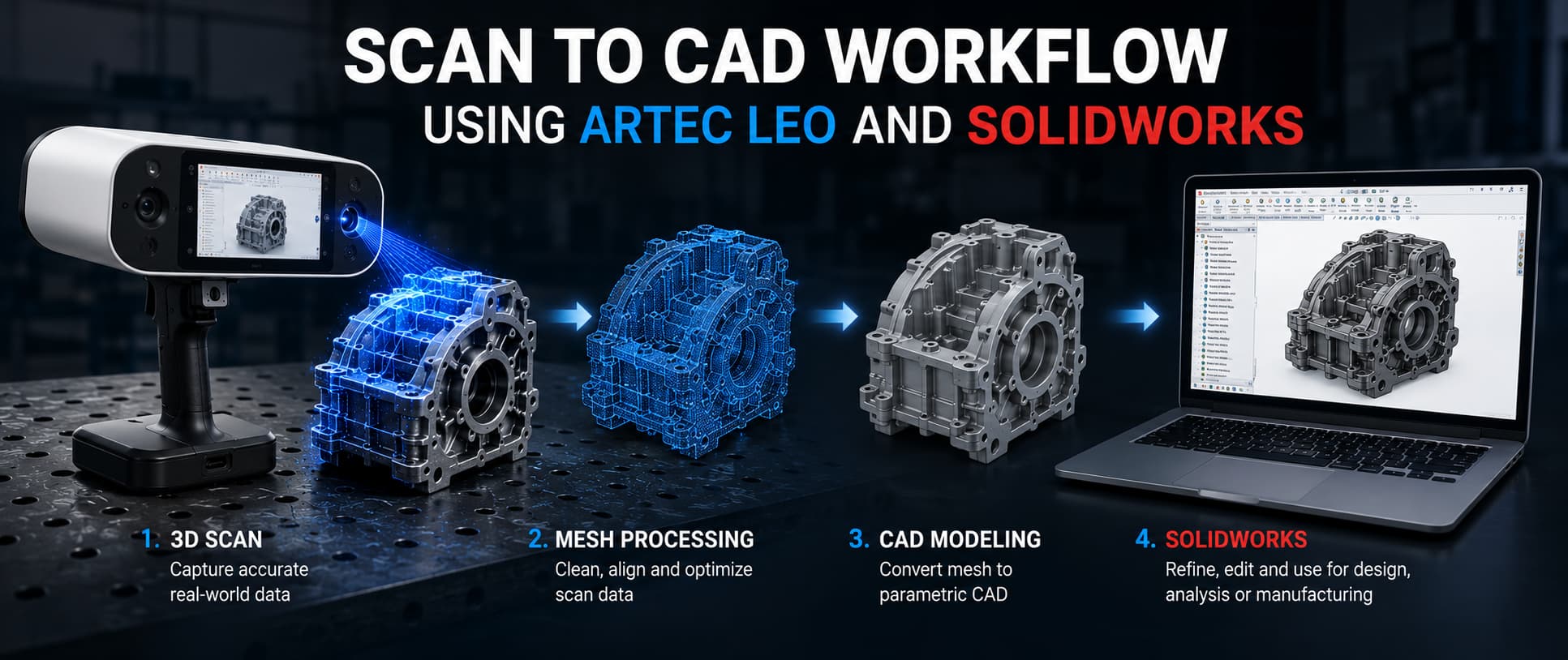
The Scan-to-CAD Workflow
Step 1: Capture the Physical Object
Start by scanning the component with Artec Leo.
Common examples include:
- Legacy parts
- Prototype components
- Plastic housings
- Automotive parts
- Consumer products
The scanner captures detailed geometry while displaying results in real time.
Step 2: Process the Scan Data
Using Artec Studio, the scan data is cleaned and optimized.
Typical processing includes:
- Scan alignment
- Mesh fusion
- Noise removal
- Hole filling
The result is a high-quality 3D mesh ready for CAD conversion.
Step 3: Import into SOLIDWORKS
The processed mesh can be imported into SOLIDWORKS using reverse engineering workflows.
Engineers can:
- Extract key dimensions
- Create reference sketches
- Build parametric features
- Reconstruct design intent
This allows scanned geometry to become a fully editable CAD model.
Step 4: Modify and Improve the Design
Once the model is in SOLIDWORKS, teams can:
- Redesign outdated parts
- Improve product performance
- Add new features
- Prepare designs for manufacturing
This flexibility makes the workflow valuable for both new product development and reverse engineering projects.
Common Applications
Many companies lack CAD files for older components. Scanning with Artec Leo provides an efficient way to recreate accurate digital models.
Product Redesign
Existing products can be scanned and modified without starting from scratch.
Rapid Prototyping
Engineers can quickly convert physical prototypes into CAD data for further refinement and testing.
Custom Manufacturing
The workflow is ideal for creating custom-fit products and one-off components.
Best Practices for Better Results
To maximize accuracy:
Why This Workflow Saves Time
Compared to traditional measurement methods, the Artec Leo and SOLIDWORKS workflow offers:
- Faster data collection
- Reduced design time
- Improved accuracy
- Fewer revision cycles
- Better collaboration between design and manufacturing teams
For many organizations, this translates directly into shorter product development timelines and lower project costs.
Final Thoughts
The combination of Artec Leo and SOLIDWORKS provides a powerful solution for modern product development. By transforming physical objects into editable CAD models, engineers can accelerate design workflows, improve accuracy, and bring products to market faster.
Whether you’re reverse engineering legacy parts, developing prototypes, or improving existing designs, a scan-to-CAD workflow can help your team work more efficiently and confidently.