One of the most exciting uses today for modern 3D scanning technology is reverse engineering. Whether you are duplicating a broken part/machine, rethinking a product, or examining a competitor’s part, you can efficiently do it using the Artec Leo 3D Scanner and Geomagic Design X.
In this Tutorial, we will show engineers and designers how to scan, process, and convert a physical part into a CAD-ready model using Artec Leo and Geomagic Design X.
Why Should You Use the Artec Leo for Reverse Engineering?
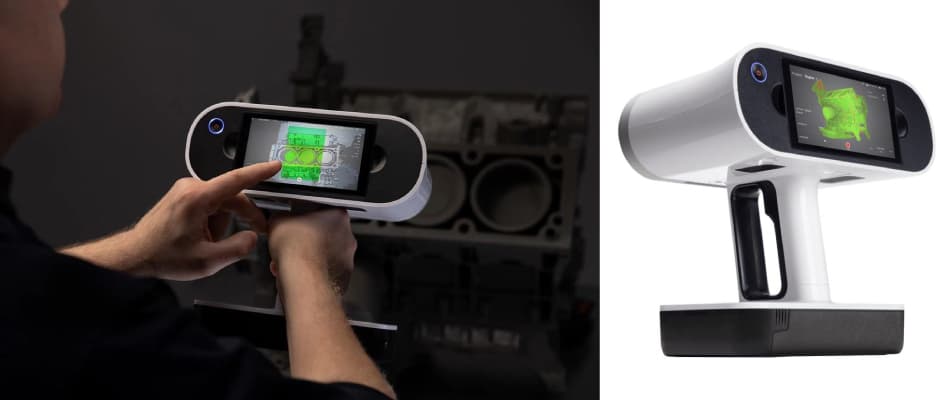
The Artec Leo is one of the more sophisticated handheld scanners available on the market today.
Some of its highlight features include:
- Wireless scanning – no cables or external computer is required.
- Real-time processing via the built-in NVIDIA Jetson processor.
- Touch screen via an easy-to-use correct interface, showing you your scan as you capture it,.
- Accuracy of up to 0.1 mm, perfect for small and medium-sized mechanical parts.
From an engineer’s perspective, this is a game changer, allowing you to collect information more quickly and move with higher mobility when scanning complex shapes or awkward areas.
How Geomagic Design X Works with the Artec Leo
The Artec Leo scans the object geometries and textures in high-resolution, while Geomagic Design X converts the 3D scans directly into awesome CAD models that you can continue working with in your design environments (SolidWorks, Siemens NX, Creo, etc.).
Some of the main features include:
- Feature-based solid modeling directly with scanned data.
- Automatic surface fitting resampling the scan data to build a NURBS surface.
- Alignment and tolerance functions for all design requirements.
- Export CAD files directly to your CAD platform in native formats.
When combined, Artec Leo and Geomagic Design X moves everything real-world into digital design.
Step-By-Step: The Reverse Engineering with Artec Leo Process
1. 3D Scan with Artec Leo
The first thing to do is scan the object. The Leo has a real-time view, making it easy to scan every angle of the object without losing important details. As a best practice, make sure to move very slowly around the part, and stay at a relatively constant distance away, for best scanning results.
Tip: Use Artec Leo’s built-in battery for total freedom – it’s perfect for workshop activity or remote fieldwork!
2. Processing in Artec Studio
Once you have completed scanning your item, you will want to save your mesh into Artec Studio, which is the leading post-processing software from Artec. You will be able to do the following in Artec Studio:
- Align and combine multiple scans.
- Deselect any noise or unusable data.
- Simplify your mesh by removing surface detail.
- Export the STL or OBJ file so it can be imported into Geomagic Design X, which is the CAD program of choice.
Artec Studio 18 utilizes artificial intelligence (AI) algorithms to automatically align scans and enhance texture, which can save you hours of post-scan clean-up.
3. Importing into Geomagic Design X
Once you have a cleaned up your mesh, you will then load it into Geomagic Design X. You will be able to use the following tools:
- Auto Surface to quickly convert models with organic shapes.
- Use Feature Wizard to obtain holes, planes, bosses, fillets, and etc.
- Sketch cross sections for any mechanical rendering.
At this point, you will have taken scanned object and turned it into a fully parametric 3D CAD model.
4. Exporting to CADD Software
In closing, take your complete parametric model and export directly to your CAD program of choice (Solidworks, Autodesk Inventor, Siemens NX, etc.).
At this point you can:
- Edit/redesign your item.
- Run simulations.
- Prep once again for 3D print or CNC machining.
Businesses and Industries that Can Utilize the Workflow Above:
- Automotive & Aerospace: Parts create complex geometries or legacy components.
- Manufacturing: Inspection or redesign a tool or mold.
- Healthcare: Custom prosthetics or designing medical devices.
- Education & Research: Foundation of reverse engineering with a hands-on learning experience tool.
Why this combination will lead the market in 2025.
The Artec Leo + Geomagic Design X workflow is still unbeatable in speed, accuracy, and usability.
- Truly, it is completely portable scanning without cables.
- AI-driven, post-processing in Artec Studio.
- Direct design integration in CAD by Geomagic’s parametric modeling.
It is a complete, end-to-end solution, from scan to design, and ready for rapid production or innovation.
Final Thoughts
Reverse engineering has never been easier or more accessible.
With an Artec Leo, Artec Studio and Geomagic Design X, engineers are able to capture complex geometry in minutes, and convert it to accurate, editable CAD data, reducing possible project timelines up 70%.
If you are interested in learning more about how this workflow can impact your operations, please visit Digital Scan 3D to learn more or to request a demonstration.